Grok Bot Templates

Bot team templates.

Reusable blueprints for teams of Grok bots, published from our own working setup. We are releasing the team one template at a time, a new one every day. Every template is one Markdown file: download it, fill in the placeholders for your situation, answer its getting-started questions, and the bot takes its place in your org chart. One rule runs through all of them: bots draft, the owner approves.

Get the Chief of Staff Kit Team Doctor, live on Grok

No account and no email required.

The org chart

The team behind the templates.

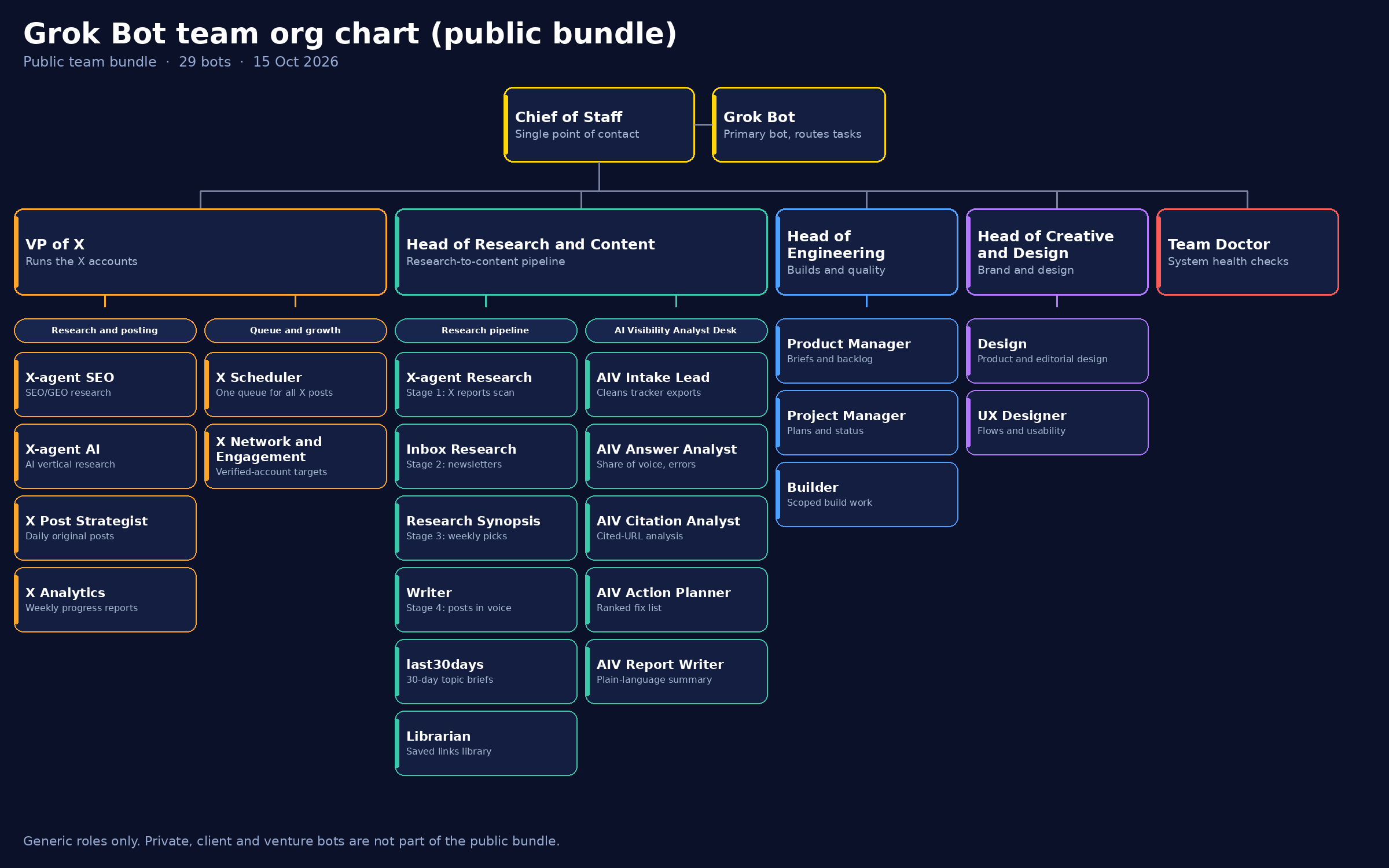
This is the public org chart of the bot team these templates come from: 29 bots in generic roles, from the Chief of Staff at the top down to the desks below. The templates package these desks one at a time. Private, client and venture bots are not part of the public bundle.

Grok Bot team org chart, public bundle: Chief of Staff and Grok Bot at the top, with the VP of X, Head of Research and Content, Head of Engineering, Head of Creative and Design, and Team Doctor as department heads and their bots below.

Click the chart to view it full size.

The team

Released one at a time.

01 · The full org · Live now · Free

Chief of Staff plus Departments Kit

One front door to a full bot org with department heads and a Team Doctor. Two ways in: the Chief of Staff on its own, live on Grok, is the quick start; the download is the full kit: all 12 roles, a getting-started skill for the first conversation, and the org chart.

12 roles · Markdown template

View and download Live bot on Grok

02 · Bot operations · Live now · Free

Team Doctor

Monitors bot health, failed routines, overlaps and broken connectors, then proposes fixes for approval. The first template out; you can download it here or meet it live on Grok.

1 role · Markdown template

View and download Live bot on Grok

03 · Audience growth · Coming soon

X Growth Desk

Grows an X account with original posts, smart replies, analytics and networking, steered by a weekly scorecard.

7 roles · Not yet released

04 · Content pipeline · Coming soon

Research-to-Content Pipeline

Turns X and newsletter reading into a searchable archive and ready-to-post drafts for every channel you publish on.

5 roles · Not yet released

05 · Investing · Coming soon

Investment Research Desk

Ticker or headline in, sourced verdict-first report out. Research and education, not financial advice.

8 roles · Not yet released

06 · AI visibility · Coming soon

AI Visibility Analyst Desk

Turns AI visibility tracker exports into a ranked fix list. You bring the export; the desk brings the decisions.

5 roles · Not yet released

07 · Publishing · Coming soon

Ad Intelligence Publication Desk

Runs a site, newsletter, social channels and sponsorships from one ad intelligence dataset.

6 roles · Not yet released
How it works

From download to a working bot.

Step 1

Download a template

Each template is a single Markdown file describing one bot role or a whole desk: its job, inputs, outputs, schedule and guardrails.

Step 2

Make it yours

Fill in the placeholders marked {{like_this}} with your brand, accounts, topics and schedule, then answer the getting-started questions at the end of the file.

Step 3

Put it to work

Install the file as a Grok bot. It starts drafting and reporting; every external action waits for your approval, by design.

What is next.

This directory is a test: our own bot team's templates, released one at a time to see what gets picked up. Once the full team is out, the next step is a submission desk, where you can publish your team's org chart and your bots alongside ours.

Try the Team Doctor template